

Description
Download InterMapper RemoteAccess – Secure Remote Network Monitoring Tool
Overview
InterMapper RemoteAccess is a powerful yet easy‑to‑install network monitoring solution that lets IT professionals and power users keep an eye on the health of their infrastructure from anywhere in the world. Built as an extension to the core InterMapper platform, RemoteAccess brings live geographic traffic maps, NetFlow analysis, device diagnostics, and performance trend charts to a web‑based console that can be accessed via any modern browser. Whether you manage a sprawling enterprise network, a data‑center, or even a home lab, the tool provides real‑time visibility into bandwidth hogs, server response times, application latency, and outage events. Alerts can be configured to trigger via email, SMS, pager, or custom scripts, ensuring that you are notified the moment a threshold is crossed. While the full feature set shines in high‑end environments, the intuitive interface makes it approachable for smaller teams or tech‑savvy individuals who need a cost‑effective alternative to premium monitoring suites. Recent updates focus on bug fixes and stability improvements, reinforcing InterMapper RemoteAccess as a reliable component in any network‑ops toolbox.
Key Features of InterMapper RemoteAccess
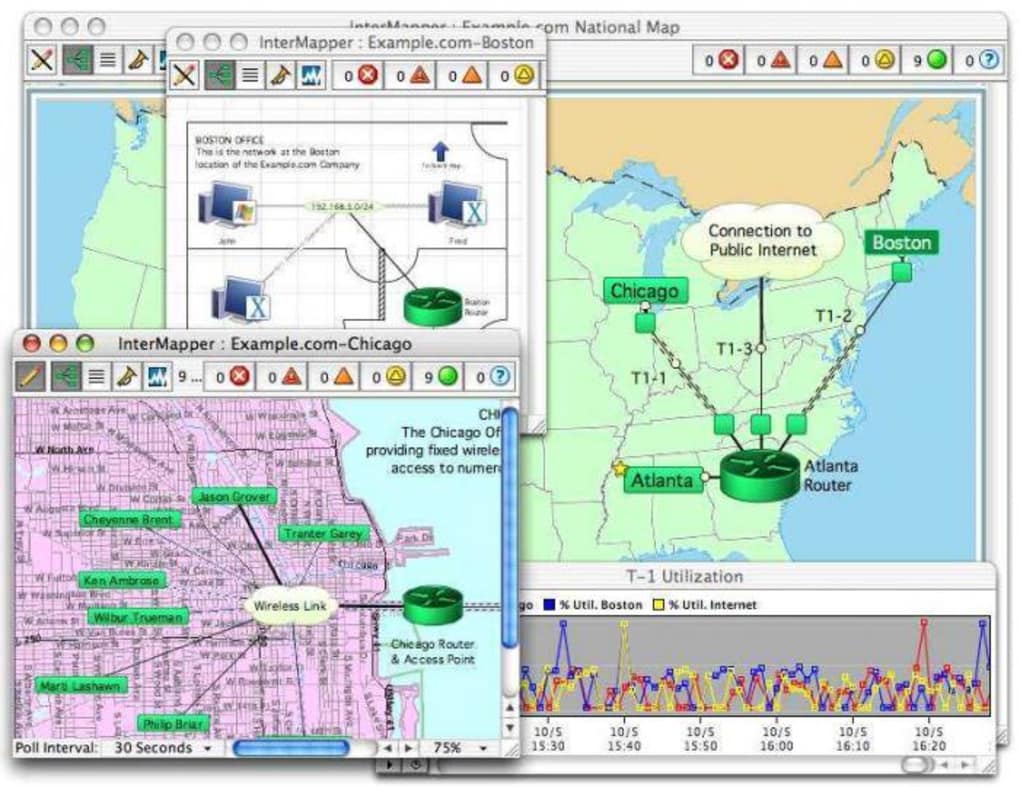
- Live Geographic Traffic Maps: Visualize traffic flow across multiple sites on an interactive world map, helping you pinpoint congestion hotspots instantly.
- NetFlow Traffic Analysis: Deep packet inspection identifies top talkers, protocols, and applications consuming bandwidth, making it simple to locate rogue downloads or misbehaving devices.
- Device Status & Location Mapping: Automatic discovery and mapping of routers, switches, servers, and endpoints with real‑time status indicators (up/down, latency, packet loss).
- Performance Trend Charts: Historical data is stored and displayed as trend graphs for CPU, memory, interface utilization, and application response times, enabling capacity planning.
- Custom Alert Engine: Define thresholds for traffic volume, latency, or device health; alerts can be sent via email, SMS, pager, or executed as scripts for automated remediation.
- Network Forensics & Diagnostics: Capture packet traces on demand, run built‑in diagnostics, and generate detailed reports for post‑incident analysis.
- Multi‑Platform Web Console: Access the dashboard from Windows, macOS, Linux, Android, or iOS browsers without installing additional client software.
- Secure Remote Access: Encrypted HTTPS connections protect monitoring data while traveling over public networks, and role‑based access controls limit visibility to authorized users.
- Scalable Architecture: Designed to handle thousands of devices and multiple remote sites, the solution scales horizontally by adding additional InterMapper collectors.
- Integration Friendly: APIs and SNMP traps allow integration with ticketing systems, SIEM platforms, and third‑party automation tools.
Installation and Usage Guide
Getting InterMapper RemoteAccess up and running is straightforward, even for users who are new to network monitoring. Follow these steps to ensure a smooth deployment:
- Prerequisite – Core InterMapper Installation: RemoteAccess requires a fully functional InterMapper server. Download the latest InterMapper installer from the official website, run the installer on a Windows or Linux machine, and complete the initial setup wizard. Verify that the core platform is collecting data from your devices via SNMP, NetFlow, or other supported protocols.
- Download RemoteAccess Package: Navigate to the “Downloads” section of the InterMapper portal, locate the RemoteAccess module, and click the “Download” button. The package is a compressed ZIP file containing the web‑frontend and configuration scripts.
- Extract and Deploy: Unzip the package to a directory accessible by your web server (e.g.,
C:\inetpub\wwwroot\intermapper\remoteaccesson Windows IIS or/var/www/html/intermapper/remoteaccesson Apache/Nginx). Ensure the web server has read/write permissions for the configuration files. - Configure Connection Settings: Open the
config.php(orconfig.yamlfor Linux) file and enter the IP address, port, and authentication credentials of your core InterMapper instance. Enable SSL/TLS by pointing to your server’s certificate files. - Set Up a Dedicated User Account: In the InterMapper admin console, create a new user role for RemoteAccess with “Read‑Only” or “Administrator” permissions based on your security policy. Assign this role to the account used by the RemoteAccess web console.
- Start the Web Service: Restart your web server to load the new configuration. Browse to
https://yourserver/remoteaccessand log in with the credentials you created. The dashboard should populate with live maps and device lists automatically. - Define Alerts and Thresholds: From the “Alerts” tab, click “Add New Alert,” select the metric (e.g., interface bandwidth), set a threshold (e.g., 80 % utilization), and choose the notification method (email, SMS, script). Test the alert by generating traffic that exceeds the limit.
- Fine‑Tune Performance Settings: Adjust the polling interval, enable data compression, and configure retention policies under the “Settings” menu to balance detail with storage usage.
- Mobile Access: Install a trusted SSL certificate on your mobile device and add a shortcut to the RemoteAccess URL. The responsive web UI works seamlessly on Android and iOS browsers, giving you on‑the‑go visibility.
- Regular Updates: Subscribe to the InterMapper update feed. When a new RemoteAccess version is released, repeat the download and extract steps; the installer will preserve your configuration while applying enhancements.
By following this checklist, you’ll have a secure, real‑time monitoring portal that can be accessed from any internet‑connected device. The intuitive UI reduces the learning curve, while the powerful alert engine ensures you never miss a critical event.
Compatibility, System Requirements, and Pros & Cons
InterMapper RemoteAccess is a web‑based front‑end, so it runs on any operating system that can host a modern web server with HTTPS support. Officially supported platforms include:
- Windows Server 2016, 2019, 2022 (IIS 10 or later)
- Linux distributions – Ubuntu 20.04 LTS, CentOS 8, Red Hat Enterprise Linux 8 (Apache 2.4 or Nginx 1.18+)
- macOS Server (optional – primarily for development or testing environments)
- Client browsers – Chrome, Firefox, Edge, Safari (latest versions recommended)
- Mobile access – Android 9+, iOS 13+ (any modern mobile browser)
Minimum hardware recommendations for a modest deployment (up to 500 devices) are a dual‑core CPU, 8 GB RAM, and 100 GB of SSD storage for logs and historic data. Larger enterprises should scale resources proportionally.
Pros
- Comprehensive real‑time visualizations that simplify troubleshooting.
- Powerful NetFlow analysis helps identify bandwidth hogs without additional hardware.
- Flexible alerting system supports email, SMS, pager, and custom scripts.
- Secure HTTPS access and role‑based permissions protect sensitive network data.
- Scalable architecture can grow from small offices to multi‑site enterprises.
- Responsive web UI works on desktops, tablets, and smartphones.
- Integration APIs enable automation with existing ITSM and SIEM tools.
- Cost‑effective alternative to high‑priced enterprise monitoring suites.
- Regular updates and a dedicated support community keep the product current.
- Easy to install for users familiar with basic web server administration.
Cons
- Requires a functional core InterMapper installation; not a standalone product.
- Initial setup can be intimidating for users without prior experience in network monitoring.
- Advanced features (e.g., deep packet capture) may need additional licensing.
- Performance may degrade if hardware resources are undersized for large deployments.
- Mobile experience, while functional, is limited compared to a native app.
- Documentation, while thorough, assumes some familiarity with networking concepts.
Overall Rating: 4.5/5 – InterMapper RemoteAccess delivers enterprise‑grade monitoring at a fraction of the cost, with a UI that balances depth and simplicity. The requirement for a core InterMapper instance adds a step, but the payoff in visibility and alerting capabilities is well worth it.
Frequently Asked Questions
Do I need a separate license for InterMapper RemoteAccess?
RemoteAccess is sold as an add‑on to the core InterMapper license. If you already own InterMapper, you purchase a RemoteAccess seat for each user who needs web access. The pricing model is per‑user, annual subscription, and includes updates for the duration of the contract.Can RemoteAccess monitor devices that are not running SNMP?
Yes. While SNMP is the most common discovery protocol, RemoteAccess can ingest NetFlow, sFlow, and IPFIX data streams. For devices lacking these protocols, you can enable passive packet capture on a nearby switch port and forward the traffic to the InterMapper collector.Is the web interface encrypted by default?
The installer includes a self‑signed certificate, but for production use we strongly recommend installing a trusted SSL/TLS certificate from a recognized CA. Once configured, all communication between the browser and RemoteAccess occurs over HTTPS, ensuring data privacy.How many devices can RemoteAccess monitor simultaneously?
The platform itself has no hard limit; performance depends on the underlying hardware and database configuration. In practice, a modest server can comfortably handle 2,000–3,000 devices. For larger environments, you can distribute the load across multiple InterMapper collectors and load‑balance the web front‑end.Can I integrate RemoteAccess alerts with my ticketing system?
Yes. RemoteAccess supports webhook notifications and can execute custom scripts when an alert fires. By using the provided API, you can automatically create tickets in ServiceNow, Jira, or other ITSM platforms, ensuring that incidents are tracked end‑to‑end.Conclusion – Why You Should Download InterMapper RemoteAccess Today
In today’s hyper‑connected world, network downtime translates directly into lost revenue and frustrated users. InterMapper RemoteAccess equips you with a centralized, secure, and visually rich dashboard that transforms raw traffic data into actionable insights. The combination of live geographic maps, NetFlow analytics, and a versatile alert engine means you can detect problems before they impact end‑users, and you can do it from a laptop on a coffee shop Wi‑Fi or a smartphone while traveling. Although it builds on the core InterMapper platform, the installation process is streamlined, and the web‑based UI eliminates the need for additional client software. For organizations seeking enterprise‑grade monitoring without the hefty price tag of competing solutions, RemoteAccess offers an attractive balance of features, scalability, and affordability.
Ready to take control of your network’s health? Download InterMapper RemoteAccess now, install it alongside your existing InterMapper server, and experience real‑time visibility that empowers your IT team to act fast, stay secure, and keep the business moving forward.
Guides & Tutorials for InterMapper RemoteAccess
How to install InterMapper RemoteAccess
- Click the Preview / Download button above.
- Once redirected, accept the terms and click Install.
- Wait for the InterMapper RemoteAccess download to finish on your device.
How to use InterMapper RemoteAccess
This software is primarily used for its core features described above. Open the app after installation to explore its capabilities.
User Reviews for InterMapper RemoteAccess 0
No reviews found





.webp)